Write clean and modern ABAP code
- Clean ABAP as a Foundation
- Fundamentals of clean development
- Modern language features
- Examples of modern ABAP
- Naming Conventions – Recommendations: NCs vs. Clean Code
- ABAP Cleaner
ABAP has been around since 1983, and the language’s scope has grown steadily ever since. As a result, the language supports various programming paradigms, and there are often different alternatives for similar purposes. For example, function groups and modules can be used as imperative precursors similar to classes in ABAP OO. In addition, there are many commands marked as obsolete that are frequently found in existing programs or in sample code on the Internet and are therefore still used in new developments.
The SAP recognized this problem itself and created the Clean ABAP Guidelines to support developers. These are based on the book Clean Code by Robert C. Martin and adapt various best practices for ABAP. The guidelines provide specifications for many areas, such as the naming of objects and variables, the choice of the right language, and the formatting and commenting of code.
Recommendations from the Clean ABAP Guidelines are highlighted in this section. A link is always provided to the relevant section of the guidelines.
In addition, the SAP ABAP is constantly being developed further. The ABAP Feature Matrix provides an overview of new developments.
The following sections provide examples of modern ABAP code, but are not intended to be exhaustive. A basic understanding of ABAP, and ABAP Objects in particular, is required.
Clean ABAP as a Foundation
Clean ABAP represents the adaptation of the principles from Robert C. Martin’s book to ABAP. The official document released in the SAP repository was launched by Florian Hoffmann and Klaus Häuptle in 2019 and has since been expanded as open source by the ABAP community.
Example rule with explanation (Prefer inline to up-front declarations in the Clean ABAP Guide):
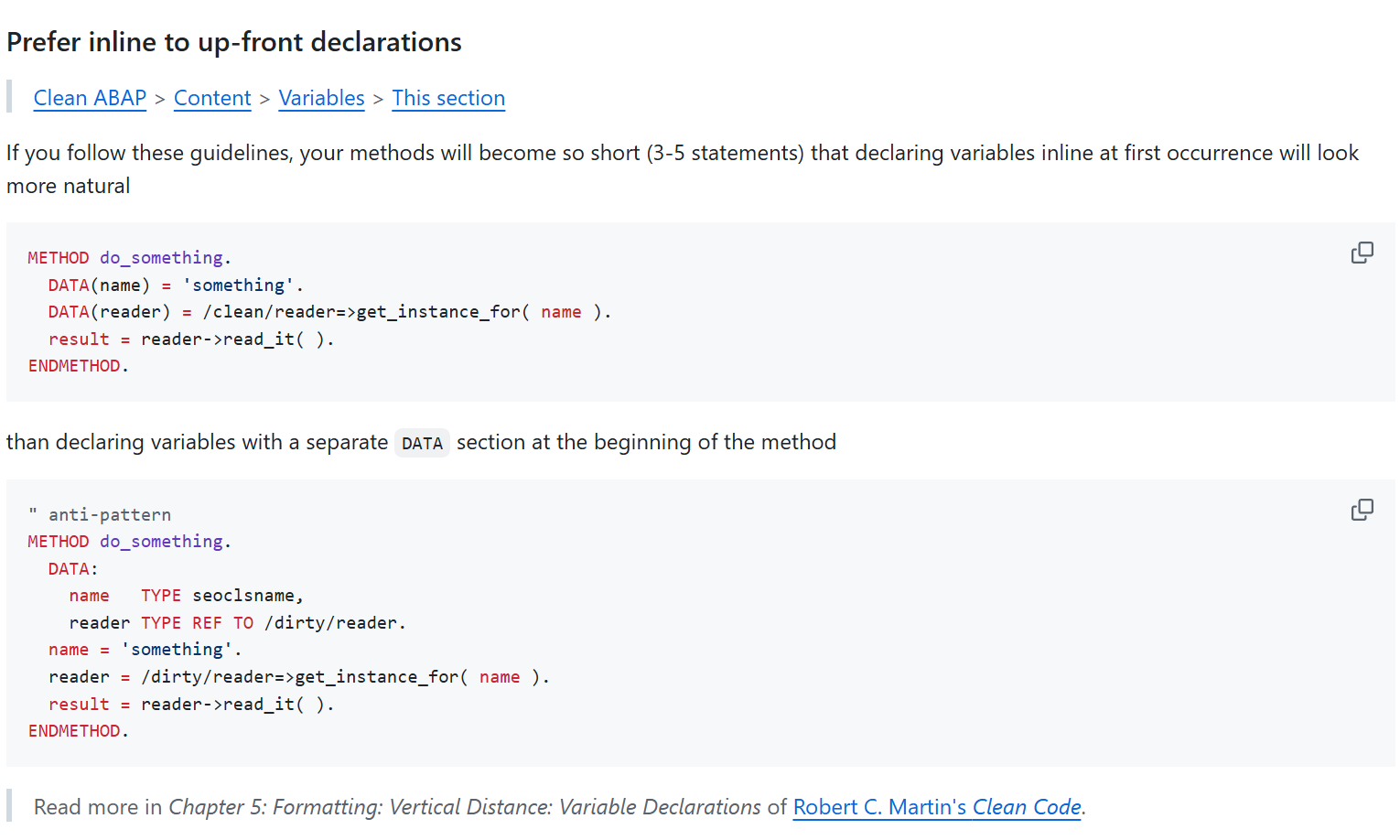
Clean ABAP Example Rule Prefer inline to up-front declarations
The idea behind Clean ABAP is that there is no single version of Clean ABAP with a fixed, unchanging set of rules. Teams are encouraged to adapt and modify the rules to best suit their specific needs. The public version of Clean ABAP provides an excellent foundation for this. The only important thing here is that these rules should be binding and apply to all teams within a company. The fundamental idea behind Clean ABAP—consistent code reviews—would be undermined if the Financials team had different ABAP rules than the Sales team. All Clean ABAP rules are in place today and should always be justified and explained.
Clean ABAP can generally be applied to any version of ABAP—from R2 to ABAP Cloud.
DSAG recommendation
The rules in the public repository are recognized by most ABAP experts. The authors of the DSAG guidelines recommend using the Clean ABAP rules for your coding and as a basis for code reviews. Discussions about code among developers can often be resolved with a Clean ABAP rule.
Clean ABAP & development guidelines
The company-adapted form of Clean ABAP should be a supplementary document to the applicable development guidelines so that it can be used everywhere. Check the application of the rules with an automatic tool such as Code Pal for ABAP in the ABAP Test Cockpit.
Clean ABAP Owner
In every development team there should be a Clean ABAP owner - preferably on a rotating basis - who is the contact person and person responsible for changes. Changes and extensions must be communicated and agreed upon separately in the teams. Clean ABAP works best when everyone involved supports the rules, which requires compromises and coordination within the team.
Clean ABAP is a process
Applying or learning Clean ABAP is not a one-time workshop or management directive. It takes time, practice, motivation and constant determination to write better ABAP programs.
The activities that ensure the application of Clean ABAP are called pair programming, code reviews, refactoring and training. The organization must create appropriate conditions for this.
Fundamentals of clean development
This section presents a short selection of important rules for clean development with references to sources for further information.
The goal of Clean ABAP is to write clean code that is easy for people to understand. This is evident, for example, in short methods and expressive names.
Expressive names
An important element of Clean ABAP is the correct naming of development objects. Good names are readable and understandable, and make it immediately clear what it is about. In everyday ABAP development, the temptation is to reuse technical names from the SAP; this However, it can make it more difficult to read, e.g. tj02_list is more difficult to understand than active_status or at least requires more knowledge of ABAP.
Comments
Express yourself through code - not comments.
This should be one of the guiding principles when writing ABAP. Check each comment to see whether it is a replacement for a naming or modularization that needs to be improved. A long piece of code that begins with the comment “Process positions” suggests that a method with an appropriate name could say and do exactly this. Rather than describing what is being done, a comment should provide information about why something is done the way it is and, if necessary, briefly explain the context. ABAP Doc must be used for code documentation, so code comments can only be used for specific, line-related explanations. For example, if functions and error handling blocks have not been programmed out, there are still TODOs or open questions that need to be resolved over the course of the life cycle.
Very outdated ABAP guidelines with statements like:
Logically related units should be commented, with the comment preceding the respective block.
or
In the case of long and deeply nested control structures, recognizing such blocks is made easier by inserting a comment at the end that refers to the beginning.
Here the ABAP guidelines already assume that the so-called Spaghetti Code is written. Comments can never be the solution to a lack of modularization and breaking deep nesting. These readability problems should be solved through consistent modularization and not through comments.
Clean ABAP recommends Explanation and structuring via code, not via comments.
The Clean ABAP guide contains everything you should consider about comments, see.
Modern language features
This section shows a brief overview of modern language resources from ABAP without claiming to be complete.
Declarations
In the classic declaration of variables, all declarations are placed in front of a method in the head, and then the method works with these variables:
DATA mein_string TYPE string.
DATA mein_int    TYPE i.

" hier wird jetzt mit den Variablen gearbeitet
mein_string = `hello world`.
mein_int = strlen( mein_string ).
Instead, using inline declarations, variables can be declared anywhere in the method and assigned directly:
DATA(mein_string) = `hello worlddd`.
Clean ABAP recommends preferring inline declarations over classic declarations.
Declaration with FINAL
Version 7.57: Inline declaration with FINAL(var) instead of DATA(var)
FINAL can be used to declare immutable variables in ABAP. These can be set once, but cannot be changed afterwards:
FINAL(var) = 1.
var = var + 1. " Fehler - Variable darf nicht geändert werden
The advantage of a FINAL declaration is that a developer reading the code now knows that he does not need to pay further attention to whether the value of the variable may is changed later in the code.
Function Calls
Since version 7.5, methods in ABAP are no longer called via CALL METHOD objekt->methode ..., but rather via objekt->methode( ... ). This shortens ABAP code and makes it easier for developers from other backgrounds to understand the code.
As part of this change, other calls were also designed similarly to those in other programming languages. Predicate methods, i.e. methods that return one of the abap_bool truth values abap_true or abap_false, can be called in a IF: Instead of IF is_predicate( ) = abap_true. you can simply write IF is_predicate( )..
Modern alternatives have also been created for many imperative ABAP statements.
Clean ABAP recommends always preferring functional language elements.
An example is the old and new syntax to convert a string to uppercase:
TRANSLATE string1 TO UPPER CASE. " alte, imperative Variante
string2 = to_upper( string2 ).   " neue Variante mit Funktionsaufruf
Another example is determining the number of rows in an internal table:
DESCRIBE TABLE itab LINES zeilen. " alte, imperative Variante
zeilen = lines( itab ).           " neue Variante mit Funktionsaufruf
Logical expression assignments
Another example is the xsdbool function. Originally designed to process XML, it is now the preferred one despite its name Variant to assign the result of a logical expression to a variable:
" Direct assignment using xsdbool
DATA(is_true) = xsdbool( len > 10 ).

" Traditional evaluation using IF
IF len > 10.
    is_true = abap_true.
ELSE.
    is_true = abap_false.
ENDIF.
Clean ABAP recommends preferring the upper variant.
Functions in the ABAP help
ABAP Help provides lists of features for:
- mathematical calculations,
- logical functions,
- working with strings,
- working with byte strings,
- and working with internal tables.
ABAP Doc
ABAP Doc is the modern variant of creating documentation for development objects. In the ABAP development tools, this documentation for an element can then be quickly displayed with F2.
For example, the documentation for a class is specified as follows:
"! Description of what the class does
CLASS demo DEFINITION.
In the ABAP Doc documentation for the class, general notes and the purpose of the class can thus be documented in a way that is both machine-readable and easy for humans to understand; similarly, notes on the individual methods and their parameters can be created using ABAP Doc. The primary users of ABAP Doc documentation are the users/callers (or developers) of the class. This feature is therefore useful for classes that are made available for use by other functions.
For more information about ABAPDoc, see section Documentation/ABAP Doc.
Constructor operators
Constructor operators are a fairly new ABAP language device and consist of the operator itself, a type specification, and parameters within parentheses. So For data(instance) = new class( number = 1 )., the operator is NEW, the type is class, and number = 1 is the parameter specification. With a constructor operator In principle, a new value is created, in the example above a new instance of a class is created.
Many typical programming tasks can be solved more quickly and precisely using constructor operators. This section shows the use of various constructor operators.
A special feature is the type information #. The developer thereby instructs ABAP to derive the appropriate type from the context. Is done using a constructor operation If a previously declared variable is set, the type specification # means that a value of the type of the variable is created.
DATA table TYPE table_type.
table = VALUE #( ). " Erzeugen einer leeren Tabelle vom Typ table_type
Create references with NEW
As shown in the previous section, new instances of a class can be created with NEW.
" Moderne Variante
DATA(object) = NEW lcl_configuration( number = 1 ).

" Alte, obsolete Variante
CREATE OBJECT object TYPE lcl_configuration.
Use of new command variants (CALL TRANSACTION WITH AUTHORITY-CHECK)
Old, obsolete variants of commands are often used. An example of this is the command CALL TRANSACTION in old screens or programs to open a transaction.
The SAP documentation clearly distinguishes between the obsoleten Variante and the variant to be used - the difference that in the latter variant Either WITH AUTHORITY-CHECK or WITHOUT AUTHORITY-CHECK must always be specified.
" Obsolete Variante
" ggf. steht hier ein Aufruf von AUTHORITY_CHECK_TCODE oder das Berechtigungsobjekt wird manuell geprüft
CALL TRANSACTION 'IW21'.

" Aktuelle Variante
CALL TRANSACTION 'IW21' WITH AUTHORITY-CHECK.
We recommend that you regularly check the SAP documentation to avoid such errors.
Examples of modern ABAP
This section shows some examples of modern alternatives to old and deprecated ABAP syntax. The following examples partially use the following structure and table definition:
TYPES: BEGIN OF person,
            age  TYPE i,
            name TYPE string,
        END OF person.

TYPES persons TYPE STANDARD TABLE OF person WITH EMPTY KEY.
Create structures and tables
With the VALUE operator, internal tables can be created much faster and more clearly:
" Alte Variante
DATA old_person  TYPE person.
DATA old_persons TYPE persons.

old_person-age  = 30.
old_person-name = `Max Mustermann`.

INSERT old_person INTO TABLE old_persons.


" Moderne Syntax
DATA(new_persons) = VALUE persons( ( age = 30 name = `Max Mustermann` ) ).
Read values from tables
To read tables, the new table expression syntax can be used instead of the old READ TABLE command:
" Alte Variante
READ TABLE persons INDEX 1 INTO DATA(first_person_old).

" Moderne Syntax
DATA(first_person_new) = persons[ 1 ].
Table expressions can also be nested; the nested_tables[1][2] function reads the second row of the table, which in turn is contained within the first row of nested_tables.
The advantage of the new syntax becomes apparent, for example, when a specific column needs to be accessed directly:
" Alte Variante
READ TABLE persons WITH KEY name = `Maria Musterfrau` INTO DATA(maria_old).
DATA(age_maria_old) = maria_old-age.

" Moderne Syntax
DATA(age_maria_new) = persons[ name = `Maria Musterfrau` ]-age.
It is important to note the difference in error handling: If READ TABLE cannot find a row, a value of sy-subrc other than 0 (or 2) indicates this. A table expression on the other hand, throws the cx_sy_itab_line_not_found exception. Instead of catching this exception, however, there are two brief options for the typical handling of missing values: returning an initial value or a specified default value:
" Alte Variante
READ TABLE persons WITH KEY name = `unbekannt` INTO DATA(unknown_person_old).
IF sy-subrc <> 0.
    " tue etwas anderes
ENDIF.

" Moderne Syntax
" Variante 1: Ergebnis ist initial, wenn Zeile nicht gefunden
DATA(unknown_person_new_optional) = VALUE #( persons[ name = `unbekannt` ] OPTIONAL ).
" Variante 2: Ergebnis entspricht Default-Fall, wenn Zeile nicht gefunden
DATA(unknown_person_new_default) = VALUE #( persons[ name = `unbekannt` ]
                                            DEFAULT VALUE #( name = `Standardergebnis`
                                                                age  = 99 ) ).
Convert tables
Often a table of another type has to be determined from a table of one type. In other programming languages, a map method is often available for this.
In ABAP, however, this can also be implemented using a VALUE statement. If, for example, the read_person method loads an object to the person structure used, Converting the table looks like this:
" Alte Variante
DATA(person_objects_old) = VALUE person_objects( ).

LOOP AT persons INTO DATA(loop_person).
    INSERT read_person_info( loop_person ) INTO TABLE person_objects_old.
ENDLOOP.

" Moderne Syntax
DATA(person_objects_new) = VALUE person_objects( FOR p IN persons
                                                    ( read_person_info( p ) ) ).
The following examples show how only specific rows of a table can be retrieved using an index:
" Alte Syntax
DATA(shorter_table_old) = VALUE persons( ).

LOOP AT persons INTO DATA(loop_person).
    IF sy-tabix >= 2.
    INSERT loop_person INTO TABLE shorter_table_old.
    ENDIF.
ENDLOOP.

" Moderne Syntax
DATA(shorter_table_new) = VALUE persons( ( LINES OF persons FROM 2 ) ).
If rows are to be filtered based on a condition, the modern syntax looks like this:
DATA(younger_persons) = VALUE persons( FOR p IN persons WHERE ( age < 20 )
                                           ( p ) ).
For many of the options that LOOP AT offers - for example groupings - there are also equivalents in the VALUE variant. Further information can be found at in the SAP documentation.
String templates and conversion exits
In classic syntax, strings had to be assembled for output using CONCATENATE or &&. As a modern alternative, ABAP offers string templates. String templates begin and always end with a |. There is a string in between, and variables or function calls can be embedded in curly brackets. A simple string template is about |Ihr Name: { name }|, where { name } is replaced by the content of the variable name. In addition, various formatting specifications can be specified for the variables, such as Using the alpha conversion exit.
For example, if you want to create a composite string such as 123 / 0010 from an order number and an operation number, it looks like this:
" Alte Syntax
CALL FUNCTION 'CONVERSION_EXIT_ALPHA_OUTPUT'
    EXPORTING input  = order_id
    IMPORTING output = order_id_ext.

DATA(identifier) = VALUE string( ).
CONCATENATE order_id_ext '/' operation_id INTO identifier SEPARATED BY space.

" Moderne Syntax
FINAL(identifier_modern) = |{ order_id ALPHA = OUT WIDTH = 1 } / { operation_id }|.
The SAP documentation on string templates provides further information on use.
Determining values from tables, e.g., the minimum
In addition to the VALUE operator, there are other constructor expressions to handle various typical programming tasks with a more precise syntax. A complete list of the Construction expressions can be found in the SAP documentation.
For example, in order to determine a single value such as a minimum from a table, there is the reduce function in other programming languages REDUCE constructor operator. For example, the following listing shows how the youngest person can be determined from a list of people:
" Alte Variante
DATA(youngest_person_old) = VALUE #( persons[ 1 ] OPTIONAL ).

LOOP AT persons INTO DATA(loop_person).
    IF loop_person-age < youngest_person_old-age.
    youngest_person_old = loop_person.
    ENDIF.
ENDLOOP.

" Moderne Syntax
DATA(youngest_person_new) = REDUCE #( INIT youngest = VALUE person( persons[ 1 ] OPTIONAL )
                                        FOR p IN persons
                                        NEXT youngest = COND #( WHEN p-age < youngest-age
                                                                THEN p
                                                                ELSE youngest ) ).
Naming Conventions – Recommendations: NCs vs. Clean Code
Names for repository objects
For repository objects such as classes, a naming convention should always be established within the company, since all objects of a given type share the same namespace. For example, if a class named ZCL_AUFTRAG is created for maintenance orders, this name is no longer available for service orders, and a developer reading the class name cannot immediately tell what type of order it refers to. To address this, the development guideline can specify module prefixes, such as ZCL_<MODUL>-NAME – in the example, ZCL_PM_AUFTRAG. Non-descriptive names like ZCL_DATA or ZCL_FORMULAR3 also make it harder to understand the source code and should be avoided.
Clean ABAP contains a detailed section for names in development.
Hungarian notation
Clean ABAP recommends avoiding Hungarian notation or other encodings when naming variables.
Code developed in accordance with the Clean ABAP guidelines will consist of many short methods. In these methods, it is unnecessary to include information such as a variable’s scope or type in its name. This information should be immediately apparent at a glance, or it is readily available in Eclipse—for example, by pressing F2. Instead, descriptive names should be used.
In legacy code that has not yet been modernized, however, continuing to use Hungarian notation can be helpful. However, both styles should not be mixed within a single development object.
ABAP Cleaner
ABAP Cleaner, released publicly in 2023, is an extension for ADT that enables the application of more than 90 rules for formatting and designing ABAP code.
ABAP Code s not only formatted as with Pretty Printer; optimizations are also made to the ABAP code based on the configured rules. Unused method parameters are marked with comments, and—depending on the settings—unused variables can be automatically deleted. The result of using the tool is more consistent, more readable code and a significant acceleration of development, as the Cleaner takes over tasks from the programmer.
Using the ABAP Cleaner offers a wide range of benefits for modern ABAP code development. In the opinion of the authors of this guide, using the ABAP Cleaner is absolutely essential.