Integration
- Integration
The integration of SAP systems, and also non-SAP systems, would itself go beyond the scope of this guide. Therefore, here you will primarily find technologies currently in use and an approximate direction as to which technologies will exist in the next few years. You should always keep in mind that middleware also plays an important role in distributing data and monitoring. See also section Chapter Clean Core
Additionally, you should note that with the increasing migration of SAP systems to the Cloud, non-functional requirements (NFRs) such as availability, security, scalability and observability must be taken into account from the outset. These aspects are often self-evident in on-premise environments, but must be rethought and actively integrated in the Cloud. Inadequate planning can lead to high costs for improvements, especially if a system only shows its limits when the number of users increases or in an emergency. See article “The Seven Reasons Your SAP Tech Initiatives Are Failing”
Business Accelerator Hub
The Business Accelerator Hub from SAP provides standardized documentation for all types of interfaces. If you would like to find out more about the available standard interfaces for your SAP product, you should first check the options here. Searching by product, technology and module makes it easier to find the right interfaces.
Technology
This section covers various interface technologies and provides a general overview of the most common ones.
IDoc
Intermediate Document, or IDoc for short, is a data exchange format from SAP designed to integrate different systems. Data can be loaded into the system or exported from it. Most IDocs are created on a line-item basis, meaning the entire data record is on a single line, and the data format is derived from an identifier (usually the first part of the line). In more recent systems, there are also IDocs in XML format.
RFC
Remote Function Call (RFC) is the use of classic function modules for communication across system boundaries. So-called destinations can be used to call a function module in another system.
It is also possible to call function modules from non-SAP systems; adapters are available for the various programming languages, most of which are provided by SAP. Here are a few examples
- JCo (Java)
- SAP Connector for Microsoft .NET
- SAP Cloud SDK (Java)
- @sap/cds-rfc (Node.js for CAP)
SOAP
Simple Object Access Protocol, or SOAP for short, is a standardized interface format for exchanging XML messages between different systems. The technology is also used for interfaces outside the SAP ecosystem. The payload format is not limited to XML; CSV or BASE64 data can also be used.
OData
The Open Data Protocol, or OData for short, is a standardized protocol for HTTP communication. It defines standards for how requests and responses are provided by interfaces and how integration with the HTTP protocol works. Communication can take place in XML format, but also in JSON. OData has now become the standard for building UI and API interfaces in the SAP system. The currently available version is “OData v4,” which offers additional possibilities for application integration compared to “OData v2”.
HTTP
In principle, all interfaces that use Hypertext Transfer Protocol (HTTP) can also be accessed via SAP and an HTTP client. However, implementation is usually limited to custom development, and you should first check whether standard exchange formats such as OData or SOAP are available.
Event
You can achieve the current integration using events. In this process, an event is generated at defined points in time within the standard or customer process and made available in a queue (e.g., via SAP Event Mesh). Interested applications and processes can register with the queue and are then notified of new events. An event is usually a simple message containing the triggering event, the object’s key, and a payload.
Clean Core
Which technologies are actually still relevant when switching to Clean Core and which ones should you best avoid today? In this section, you will learn about the recommended technologies when building or migrating to Clean Core. You will find information about this in the SAP guide “Supporting Business Transformation with a Cloud ERP Clean Core Strategy”.
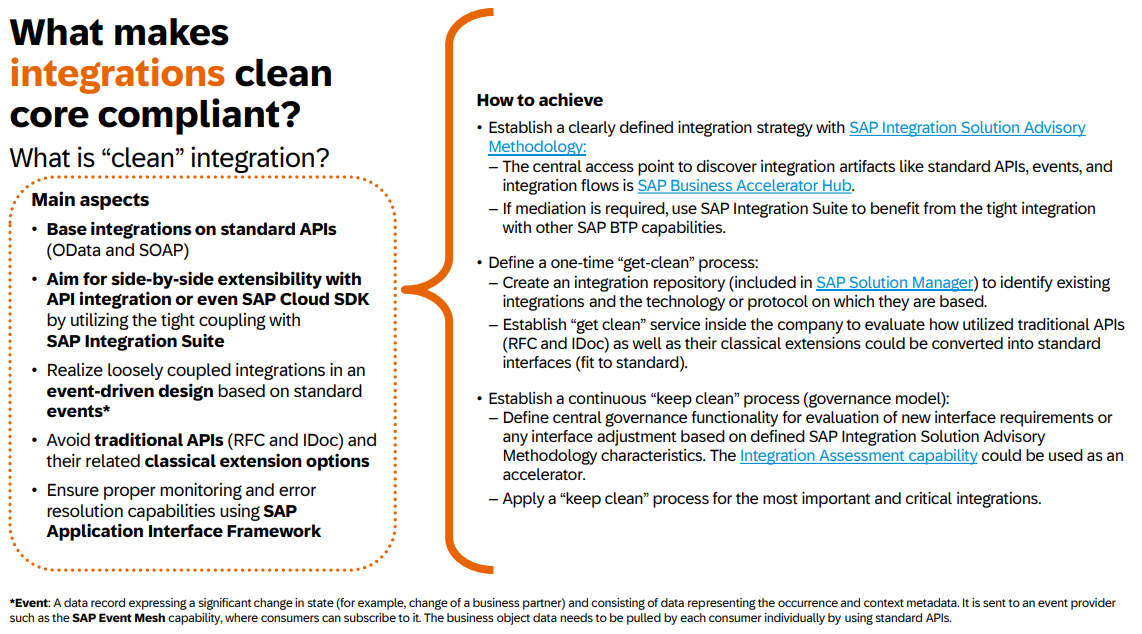
Recommendation for Clean Core integration
Here is an overview of the technologies mentioned above, categorized into those that should be continued and those that should be avoided. This classification is based on the recommendations in the guide.
| Use | Avoid |
|---|---|
| OData | RFC |
| SOAP | IDoc |
| Events | |
| HTTP (REST) |
Recommendations for Borderline Cases
When integrating SAP systems, there are borderline cases in which not all standardized SAP integration types can be utilized optimally. In such scenarios, it is essential to carefully distinguish between other SAP and non-SAP tools.
Consideration of Future Developments
SAP continuously develops its integration solutions. Therefore, it is important to always assess which technologies will gain significance in the future and which may be replaced by newer solutions. Future-oriented planning helps avoid technological dead ends and ensures that the integration remains stable and sustainable in the long term.
Existing legacy technologies
Although SAP continues to provide new integration solutions, some older technologies remain valuable and cannot yet be fully replaced. It is therefore important not to decommission existing solutions too quickly, but rather to assess their relevance in the respective corporate context. For example, IDoc and RFC are deeply rooted in many legacy systems and continue to provide reliable communication options.
Sustainable architecture and Clean-Core strategy
The design of sustainable architecture should be done taking into account the Clean-Core strategy. The Public Cloud often serves as a model for sample integrations that are characterized by high standardization and ease of maintenance. The aim is to keep the amount of individual code low and to give preference to standard solutions.
Important decision factors in borderline cases
- Costs: The financial effort for development (resources), operation, licenses and maintenance must be weighed against the benefits.
- Features: Check whether existing integration solutions cover all required functions or whether adjustments are required.
- Vendor Lock-In: Dependencies on certain SAP or third-party technologies should be viewed critically.
- Monitoring: Effective monitoring of the integration is essential to identify and resolve problems at an early stage. Reprocessing scenarios must be provided in the event of system failures.
Example: mass data transfer
EDI (Electronic Data Interchange) in S/4HANA
(Web) APIs based on REST or SOAP have their limitations. Other technologies should be used for this. For example, SAP EDI is designed to process large amounts of electronic data for 100,000+ messages per day - and is done with numerous B2B partners using standardized formats such as EDIFACT.
In a direct comparison, it quickly becomes clear why IDocs are the better choice for SAP EDI: They are asynchronous, designed for mass data and offer predefined validations as well as robust monitoring and reprocessing mechanisms. APIs, on the other hand, are mostly synchronous, process messages individually and require additional effort for error handling and mappings. Therefore, in high-load scenarios, a API-based EDI integration can cause significant performance issues and high operating costs.
Additional solutions for mass data transfer
- SAP Landscape Transformation Replication Server, ABAP and NetWeaver based
- SAP HANA Smart Data Integration (SDI), SAP HANA database-based
- Master Data Governance (MDG), based on the Data Replication Framework in ERP
Cloud Connector
If you are working with the Business Technology Platform (BTP), you also need a Cloud Connector in your infrastructure to establish a connection from the cloud to on-premises systems. The Cloud Connector acts as a gateway and proxy, routing network traffic from the internet to the correct systems in your landscape behind the firewall.
Setup
When setting up your Cloud Connector landscape, you should ensure that system tracks are separated, as stricter rules for resource access typically apply in production. In this case, at least two instances are recommended: one for DEV/TEST and one for PROD. Depending on running processes and importance, you should consider an appropriate fail-safe structure (high availability).
Protocols
Currently, there are two protocols used in most use cases and access scenarios.
- HTTP – the leading protocols here are OData and SOAP, but Plain HTTP is also possible for accessing data and systems on-premise.
- RFC – RFC-enabled function modules can also be consumed; even though they are no longer part of SAP’s strategic direction, they make many system functions available without violating the Clean Core principle.
Resources are exposed in the respective configured systems within the Cloud Connector. For HTTP, corresponding paths/URLs are exposed; for RFC, the corresponding function modules. In production, it is recommended to explicitly expose resources and avoid wildcards (*).
Extensions
When creating extensions in BTP, you typically do so using CAP (Cloud Application Programming Model) or RAP (ABAP RESTful Application Programming Model). To access data, you need a configured Cloud Connector on the sub-account. The configuration is not covered in this guide, as it is usually performed by your SAP Basis team.
In most cases, you will configure the connection to the on-premise system in the BTP Destination Service. If you use the SAP BTP ABAP Environment to create your extensions, you can also map them in the system as Communication Arrangements and Communication Systems and do not need the configuration in the Destination Service. However, if you want to extend standard Fiori applications, you need access via the sub-account to access your systems.
Access Direction
So far, you have mainly read about access from the Internet or the BTP to the on-premise environment. However, the Cloud Connector can also be used as a proxy to route traffic from an on-premise system to a cloud system and avoid a direct connection to the cloud system. The ABAP Test Cockpit on the ABAP Environment is an example of such a case.