Output Solutions
- Message control (NAST)
- Post Processing Framework (PPF)
- Print Workbench
- Application-specific solutions
- S/4HANA Output Control
The following provides an overview of the available output options.
Message control (NAST)
Message control configures output types such as printing, email, EDI, workflows, system integration (ALE), and special functions for messages in modules such as SD and MM. Production output for forms and labels is controlled using condition technique. Each message is assigned a print program and form, which are triggered when the message is generated.
The transaction NACE serves as a central entry point for maintaining message determination per application. The settings maintained there are saved in the database table TNAPR.
Note:
An evaluation of all messages generated can be created using transaction TAANA for the database table NAST. To do this, this transaction must be carried out in the productive system. In order to carry out the evaluation year by year, a new “virtual field” (ERYEAR) may have to be added beforehand. The list of results can be downloaded as an Excel table and converted into a pivot table for easier evaluation.
Such an evaluation is recommended in order to get an overview of which types of messages are actually and mainly used. In which languages Will my receipts (forms) be issued and how large is the respective volume? This helps with further planning of conversion and go-live scenarios.
You can find detailed instructions on how to use the TAANA transaction as a YouTube video at the following link.
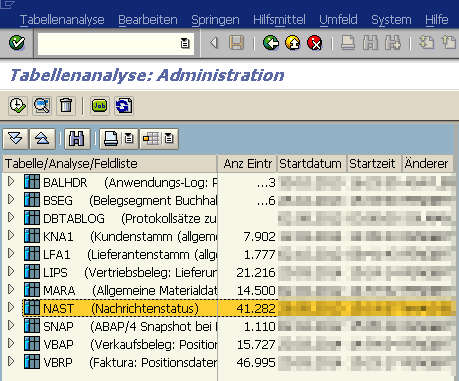
Maintenance of the table
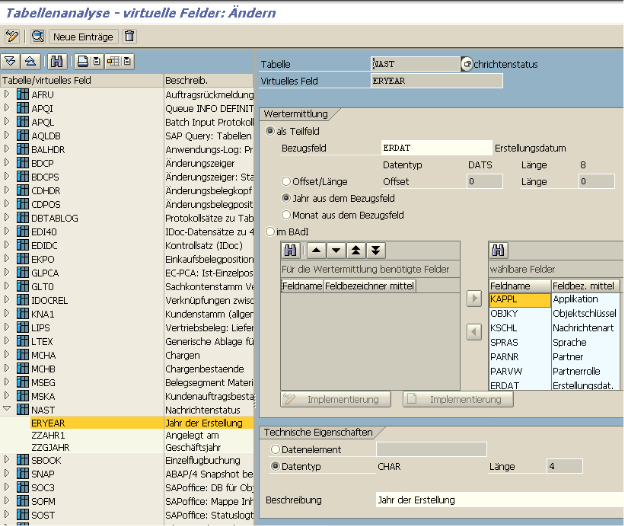
Care of the fields
Post Processing Framework (PPF)
The PPF is used to automate certain actions in delivery processing to output documents from receipts via printer or email. It is used, for example, in eWM and TM. Maintenance is carried out using transaction SPPFCADM.
Print Workbench
Documents are issued by defining correspondence types. It is used primarily as an industry solution in the IS-U area (energy suppliers), but is also generally available outside of IS-U. The data supply of an application form is encapsulated in the print workbench. SAP standard objects or customer-specific objects can be used and stored for data determination. The relevant settings will be made using transaction EFRM.
Application-specific solutions
Application-specific Customizing determines the output of documents. This type of output solution is used, for example, in FI, PP and QM. In FI, for example, the dunning form is determined depending on the dunning level.
S/4HANA Output Control
With SAP S/4HANA, SAP offers another output solution called “SAP S/4HANA Output Management”. This includes the reusable service “SAP S/4HANA Output Control”, which can be used for many complex output scenarios. At the level of organizational units, the identification of master form templates, logos and general header and footer texts can be customized. So-called “Adobe Fragments” can be used with this output solution. See the relevant section. In comparison to message control (NAST), with output control you have the restriction that no workflows and special functions can be stored.
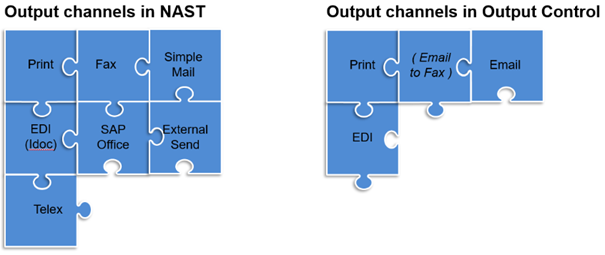
Output scenarios
In this context, BRFplus (or BRF+) is often mentioned as an output solution. This is wrong. BRFplus is an optional option to configure for the Document output to be stored (= a set of rules, similar to the condition technology NAST).
The settings in the S/4HANA Output Control are made in the GUI via the following path:
Transaction SPRO > Cross-Application Components > Output Control
FAQs on the topic of output control can be found under note 2791338.