Architectural concepts
Getting Started
This section explores the possible architectures in the Clean Core domain, where you will learn more about on-stack and side-by-side approaches and how to implement them in your architecture. Extensibility and its implementation are key components for your company to achieve Clean Core. In this context, extensibility refers to all customer enhancements in a standard SAP system as well as partner add-ons.
Scenarios
In general, you have the option of expanding your system using on-stack and/or side-by-side extensibility. Here is a diagram illustrating the possibilities.
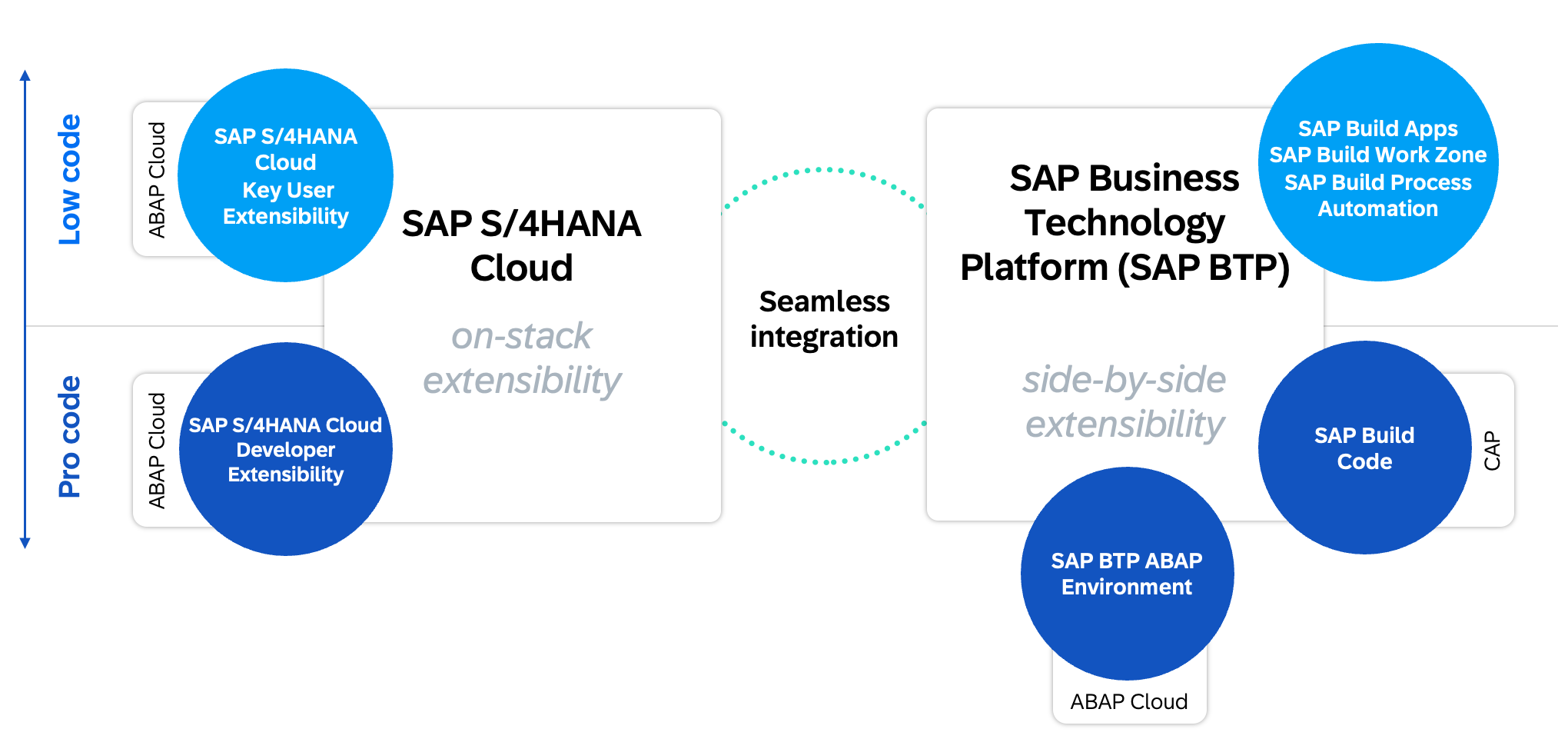
Extensibility scenarios
On-Stack
On the left you will find On-Stack Extensibility, divided into Pro Code and Low Code. In the Pro Code area you will find the classic ABAP Cloud development with the Clean Core level concept, the use of shared APIs and the extension of objects (C0 objects). You can find more about ABAP Cloud in the corresponding section of Clean Core.
In the low-code domain, the main feature is Key User Extensibility, which consists of several Fiori applications that can be used to extend the system. The most common scenarios in this area are
- Field Extension – Create new Z-fields from the database to the UI via the application.
- User Interface Customization – Customize Fiori applications, rename elements, or display the new Z-fields. Create variants and make them available to your business departments.
- Custom Logic – Implement your own BAdIs and extend the process with custom checks.
- Custom Core Data Services – Create your own Core Data Services based on the published views and make them available externally as APIs.
- uvm.
The apps are primarily intended for your key users, as they allow them to make simple changes to the system. The changes are deployed to production via standard change management (e.g. CTS).
Side-by-Side
On the right you will find Side-by-Side Extensibility, which is about decoupled development outside the core system. This example is the Business Technology Platform, BTP for short. Here you will find various tools and systems with which you can create applications to extend the system.
- SAP BTP ABAP Environment – Developing ABAP-based Extensions in the Cloud.
- SAP Build Code – Developing Extensions Based on Java or JavaScript.
In addition to pro-code solutions, SAP also provides low-code and no-code solutions through the SAP Build portfolio. Here is a brief overview of the most commonly used tools and their use cases.
- SAP Build Apps – Use this tool to create Fiori and mobile apps using drag-and-drop and simple scripts. The apps are then made available in BTP.
- SAP Build Process Automation – If you need a workflow or automation, you can create it using Process Automation and connect both SAP and non-SAP systems.
- SAP Build Work Zone – If you need centralized access to all SAP applications, whether on-stack or side-by-side, then Work Zone may be an option. In addition to the Standard Edition, there is also an Advanced Edition with collaborative features.
Strategy
Before you begin working, you should consider your extension strategy. In other words: Which tools and environments do you want to use for the extensions?
Models
There are some company factors to consider:
- Platform – Which expansion model would you like to implement in your company (CAP or RAP)? Related to this: How many developers do you need in each area?
- Expertise – Is the necessary expertise already available for the environment, or does it need to be developed first? In the ABAP domain, this would include CDS, RAP, and Fiori Elements. In the CAP domain, it would include JavaScript or Java, build pipelines, Git, and BTP.
The following detailed graphic shows the different scenarios.
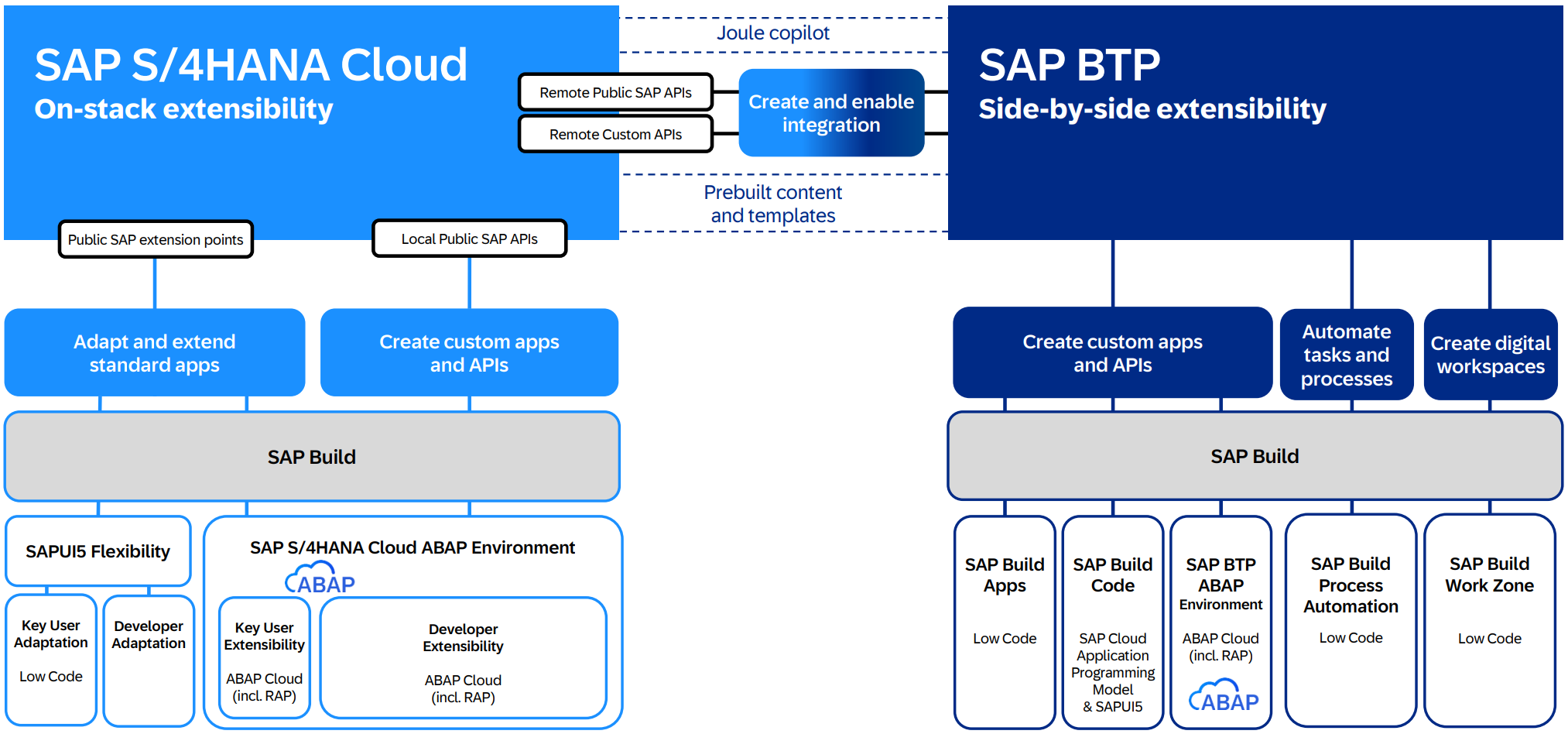
Tools and strategy
The entire SAP product portfolio is available to you, although each product requires specific skills and prerequisites. We therefore strongly recommend that you develop a strategy.
Coupling
Coupling is about the different requirements that an application brings with it. Should the application be developed on-premise or side-by-side? In this article you will find various criteria as to when which environment is worthwhile. Basically, you should understand that you can also achieve Clean Core on-premise on your own system and do not necessarily need side-by-side development.
The two coupling scenarios are:
- Tightly coupled – The application should be built on-premise.
- Loosely coupled – The application can also be developed in the cloud.
Make the Core Clean
If you have chosen the Brownfield approach, migrated your system to S/4HANA, and decided pursue a Clean Core strategy, we recommend a phased migration of your applications.
Frequently used applications are particularly worth reviewing to quickly reap the benefits of SAP Fiori. This allows you to assess each application individually to determine which ones you can modernize or perhaps even decommission because they are no longer needed. It therefore makes sense to start with an initial overview and inventory.