Use of open source software
This section describes how to integrate open-source software into your development process or custom-developed software. It addresses the first maturity level.
- Use of open source software
- abapGit for obtaining open source software
- Who provides ABAP open source software?
- Who uses ABAP open source software?
- Integration of open source tools in the development process
- Use of open source libraries in your own software
- Assessment and lifecycle of an external dependency
- Delivery of open source dependencies in your own products
abapGit for obtaining open source software
The linchpin in the context of open source in ABAP development is abapGit. Without the Git client for ABAP, collaboration on a software product across system boundaries is not possible. In our use case—the use of open-source components—obtaining these components is very easy with the help of abapGit. The installation instructions can be found at Installation. The standalone version is usually sufficient.
With abapGit you install a tool in your system that allows versioning of objects in a package hierarchy with git. To do this, it either connects directly to a Git host using online repositories, such as github.com, or exchanges ZIP files, in the case of offline repositories. The latter are particularly helpful when network connectivity between the SAP system and the Internet is not desired.
Bulk processing with abapGit
In both cases, the tool allows you to import large amounts of development objects into your system or to export development objects from your system. This may be an unwanted effect for some people, whereas otherwise all development activities in the ABAP platform can be comprehensively protected and restricted via permissions.
However, you should say goodbye to this idea. Although you can also restrict the use of abapGit based on permissions, even Exits can be implemented to further refine the permission logic. However, as long as developers have the opportunity to develop in the system what their actual activity is, they can implement their own data export program or assign themselves the necessary authorizations with just a few lines of coding, bypassing all authorization checks. Too extensive regulation of tooling inevitably leads to the construction of workarounds and hinders the development process.
It is therefore recommended to define a process for how the available tooling can be used sensibly and in a coordinated manner within the team.
Who provides ABAP open source software?
A comprehensive list of open source ABAP projects published on GitHub can be found on dotabap.org. You can submit your own projects that meet the requirements for listing to dotabap-list via a pull request.
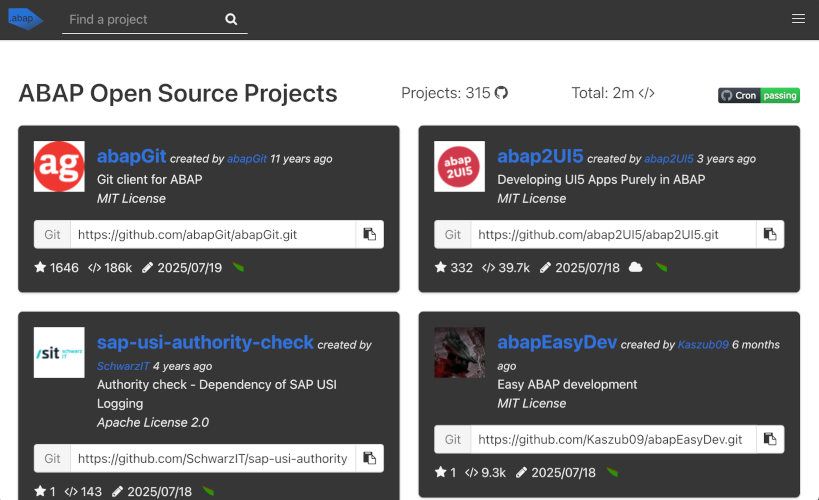
Screenshot dotabap.org
Who uses ABAP open source software?
On page Who Uses abapGit? of the abapGit documentation you will find a list of companies that use abapGit and have actively decided to be listed. From this it can be deduced that they use at least abapGit itself as open source software. SAP also uses open source ABAP. abapGit is in a customized version in SAP S/4HANA Cloud Public Edition and the SAP BTP ABAP Environment preinstalled. Projects such as Code Pal for ABAP, Project Kernseife and RAP Generator are available on GitHub and are provided with the Apache 2.0 open source license.
Integration of open source tools in the development process
You can take a first step towards dealing with open source software in ABAP development by considering the use of open source tools in your development process. This can result in a reduction in effort without having to develop an extensive open source strategy.
- Opportunities
- Reduction of expenses through the use of generators
- Increasing code quality through the use of additional code analysis tools
- Risks
- Installation of third-party software in the development system / developer PCs / continuous integration environments
Many of the opportunities of this use case have already been mentioned with examples under Motivation and opportunities. In summary, the use of open source tools in the development process relieves the burden on developers, as work steps are automated or the quality specifications are automatically checked / violations of the specifications can be corrected early and in some cases automatically.
In order to take advantage of the opportunities, the selected open source software must be installed. Depending on the software, this happens on developer PCs, in continuous integration environments or in the SAP system. As can be seen at Licenses, open source licenses exclude liability and warranty unless a separate agreement is made. There are consequently security-relevant implications for the installation and use of the software. This topic is discussed in more detail in Assessment and life cycle of an external dependency.
Use of open source libraries in your own software
An optional extension of this implementation stage is the use of open-source libraries in your own software. In this case, you integrate the selected libraries via API calls and include them in your software. This provided even greater added value, as it allows you to provide functionality in your applications that would otherwise have been difficult or impractical to develop or maintain. However, the question inevitably arises as to how such open source components are handled in productive environments and in the delivery of software. This significantly increases the importance of Assessment and life cycle of an external dependency.
- Opportunities
- Reduction of effort through integration of finished components
- Increasing the functionality of your applications
- Risks
- Installation and delivery of third-party software
Assessment and lifecycle of an external dependency
To use externally developed open-source dependencies (in the following also referred to as “components”) profitably in the long term requires a thorough assessment in advance to weigh the opportunities and risks mentioned in the previous sections against one another.
There are already published criteria, particularly with regard to risks, which can be used to make such an assessment can be, e.g. Bauer et al., “A structured approach to assess third-party library usage”. Criteria include:
- Adequacy captures how well the selected component helps solve the problem at hand.
- Documentation summarizes the availability, completeness and quality of the documentation.
- License compatibility records whether the license of a component is suitable for the application scenario and whether the license is compatible with the licenses of other components used.
- Degree of distribution summarizes the market penetration of a component.
- Tool support records whether the component is specifically supported by tools such as development environments or whether their use even hinders them. This criterion is not equally applicable to all components.
- Manufacturer support describes the extent to which maintenance and further development of a component by the manufacturer (the publishing company or the open source community) is guaranteed in the long term.
- internal quality and security records the extent to which a component takes into account internal quality criteria such as maintainability, understandability and whether mechanisms exist to check security and react to security deficiencies.
To adequately assess the criteria, a thorough review (due diligence) is required. Some red flags for enterprise use are easy to identify and can be considered initial exclusion criteria: Was the last commit a long time ago? Are there open issues that have gone unaddressed for a long time? Is there no license information available, or does the license conflict with the company’s own policies? In these cases, the component should not be used.
The decision to use an open-source component requires a number of additional considerations and is always the result of a cost-benefit analysis: How much in-house development effort can be saved by using the open-source component, and what risks does this entail?
Best Practices: Assessment Criteria
Appropriateness: To identify the component that best meets your requirements, you should first conduct research that ideally yields several candidates. In addition to pure functionality, you should also estimate the effort required to implement the functionality – compared to licensing a commercial component. Especially for common functionality. Using a third-party component is often recommended over an in-house implementation. Nevertheless, the expected effort of in-house development should be factored into the decision, as should the expected risk. In particular, if third-party code in a production system has potential access to business-critical data, this must be part of the assessment.
Appropriateness describes the extent to which the planned intended use corresponds to the scenario intended for the component. If only a few details are missing from an identified open source component to meet your own requirements, it is also possible to provide these as your own contribution to the open source component (see Beteiligung an Open Source). In this case, it is recommended that you return the customization or addition to the original project to ensure that it remains compatible with future updates.
An important aspect of suitability is the extent to which the component is intended to become part of your own application – that is, to run in the production system - or whether it will be used exclusively for development, such as for generating code from API descriptions. This also plays a key role when considering the license (see “License Compatibility”).
Internal quality and security: Since open-source components are published as source code, the code should be reviewed carefully before a decision is made to use the component. For larger components in particular, the use of code analysis tools is recommended. In some cases, the component repositories may already contain result reports from tools such as abaplint. In any case, automated checks should be performed against the organization’s own security requirements, provided that appropriate tools are already in use. The existence of automated tests is also a good indicator of the reliability and maintainability of an open-source component.
In addition, the understandability of the code should be considered. On the one hand, this concerns the clarity of the interfaces (APIs) of the component used in order to integrate them as easily as possible, and on the other hand also internal features such as the commenting of classes and methods or the descriptive naming of classes or variables. Understandable code makes it easier to find errors and, if necessary, make future extensions or adjustments. See also the section on Code Reviews. This is an important aspect, especially if the component is to be expanded in perspective (see above).
Documentation: The documentation provided for an open-source component is a key success factor, especially with regard to the APIs exposed by the component. Particular attention should be paid to its scope, clarity, and currency. On the one hand, documentation helps ensure the correct use of the component and often avoids the need for time-consuming analysis of the source code. On the other hand, it demonstrates that the component is intended for public use and may also indicate that the component is actively maintained (see also “Vendor Support”).
Even in the event that improvements, adjustments or additions are to be restored, it is advisable to pay attention in advance to documentation on how to contribute changes. Open source projects often contain a “contribution guide”, for example in the form of a file Contributing.md.
License Compatibility: Particularly in an enterprise environment, the license of an open-source component is of critical importance. It should always be verified that the component is published under a license that is compatible with the intended use case and complies with the organization’s internal policies. Some licenses may require that, if a component is used and distributed as part of a larger application, the entire application must be distributed under the same license, including disclosure of the complete source code. If the component is used solely as a development tool and is not deployed to a productive system, such clauses may not apply. In any case, consultation with the organization’s legal department is recommended.
It should also be verified that the license permits modification of the component. This may be essential for fixing bugs or adding functionality if community support declines. When multiple open-source components are used, their licenses must also be compatible with one another and not contain conflicting requirements. Furthermore, it should be noted that open source does not automatically mean free of charge. Some components may permit free use only for private purposes, while commercial use may require the payment of licensing fees. Different licenses are often available depending on the intended use case (private or commercial).
Usage and Adoption: The level of adoption of an open-source component is an important consideration during evaluation. One of the primary reasons for selecting widely used components is the reduced dependency on a specific provider.
Various criteria can be used to assess adoption, such as the number of GitHub stars or forks, or the number of results returned by an internet search. During such research, the nature of the search results should also be evaluated. Active discussions or blog posts describing successful implementations can be positive indicators, while repeated requests for help or frequent complaints may indicate potential issues. In the context of ABAP development, SAP’s position toward a project is also an important consideration. If SAP itself references the project or even uses it in its own products, this can be viewed as a strong indication that adopting the component in your own projects carries relatively low risk.
Tool support: An important feature when selecting open source components is the ability to integrate with the existing development infrastructure. Since this is quite uniform in the ABAP world, this criterion plays a minor role. A plus point would be if ATC checks were included directly for common sources of error in relation to the use of the component. Another example of tool support is portability to your own namespace as described under Delivery in our own products. The approach outlined there via abaplint in a pipeline basically works, but does not support all types of code objects.
Vendor Support: The use of an open-source component inherently creates a dependency on its provider. Therefore, it is advisable to evaluate whether the component is actively maintained and further developed. This helps ensure that defects and security vulnerabilities are likely to be addressed in a timely manner. Indicators include the number of contributors, the frequency of commits, and the release cadence. In addition to activity levels, the release and versioning strategy should also be considered. Are there major and minor releases? Are release changes clearly documented? Are incompatible changes explicitly identified?
The terms “Vendor” or “Provider” do not necessarily imply a commercial company. Many successful open-source components are maintained by volunteer communities and can still be used confidently in enterprise environments, provided there is sufficient continuity and no conflict with corporate policies. Community-driven projects often do not offer commercial support agreements, which may complicate their adoption in some organizations. Conversely, if a component is provided by a well-known company such as SAP itself, internal approval processes are often easier. On the other hand, community projects are frequently very responsive when it comes to resolving issues.
Best practices: approach and process
Periodic Review: When using open-source components, it is generally recommended to periodically reassess all of the criteria described above in order to react to changes within the open-source project or within the organization’s own application landscape. Changes in application functionality may lead to a different assessment of a component’s suitability. Likewise, changes in project structure, activity level, or licensing may result in a revised risk evaluation. Ideally, such reviews should also include researching newer open-source projects that may be better suited to the intended use case.
Competence: Working with the open-source community requires certain skills within the development team, such as reporting bugs, submitting enhancement requests, or creating pull requests to contribute improvements back to the project. If the necessary experience is lacking, appropriate training should be planned to enable effective collaboration with open-source projects.
Updates: Processes and responsibilities for updating external dependencies should be clearly defined. Whenever a new version of a component becomes available, its relevance to the organization’s applications should be assessed. If an update is deemed relevant, it should be integrated, tested, and eventually deployed to productive environments. An established update process is particularly important when security vulnerabilities become known, enabling rapid and controlled response.
Delivery of open source dependencies in your own products
One challenge associated with using open-source components in proprietary software arises when distributing software to external systems. If you develop a product or add-on that is installed in customer systems, special consideration must be given to the distribution of dependent open-source components.
Most open source ABAP projects use the customer namespace (Z/Y). Customers to whom your software is delivered also use the customer namespace. If your add-on uses a reserved namespace (/NSPC/) to prevent name collisions, this guarantee does not apply to the dependent open source components. In addition, customers may express concerns if software providers “invade” their customer namespace. It may even be that the open source component is already installed in the customer system and is being actively used there, but in a version that is not suitable for you.
A possible solution is to copy the open source component into your namespace and thus deliver and update it in isolation. With abaplint it is possible to set up a CI pipeline that sets up and automatically updates a mirror repository of the open source component in your reserved namespace. You can then deliver this repository. abapGit uses this technique to ship the ajson-Projekt together with abapGit. You can read details in the following blog post: Automagic standalone renaming of ABAP objects.