The ABAP RESTful Application Programming Model (RAP)
The ABAP RESTful Application Programming Model, or RAP, was introduced by SAP in 2018 and has been available since SAP S/4HANA 1909. Conceptually, it has many parallels with the ABAP Programming Model for SAP Fiori and can be regarded as its successor.
Both programming models provide the necessary development objects and their interactions to build applications and interfaces with their own data storage in an S/4HANA system. The evolution to RAP has significantly simplified development even further and does not require any SAP GUI transactions or SEGW services at all. With RAP, too, the entire application logic revolves around a so-called business object, which defines data storage and existing business logic and makes them available to consumers. RAP should be the first choice when developing transactional Fiori Elements applications (List Report and Object Page). However, read-only APIs, SAPUI5 Freestyle apps, or non-SAP UI technologies can also be implemented with RAP by utilizing the resulting OData services.
RAP maps the complete end-to-end (E2E) scenario from the database layer all the way to the published OData service. The business object (BO) is defined on the one hand by the virtual data model (VDM) and on the other hand by the (optionally) available behavior. In the VDM, fields are selected from the database by creating CDS views, and the BO composition tree is defined via relationships between the CDS views. This always consists of a root entity (e.g., a trip with corresponding possible instances) and any number of child entities (such as one or more instances of flight bookings under the trip). This composition tree can be built to any depth. Each child entity can only exist together with its direct parents, and its key is part of its own.
- RAP should be used productively at the earliest from Release 2021. If necessary, deal in detail with the limited range of functions in the 1909 and 2020 releases (such as the lack of validations, determinations, draft, …)!
- As a rule, you should use the integrated draft concept for new developments and only forgo it if there are good reasons.
- Since RAP is a relatively new technology, there are sometimes striking differences depending on the S/4HANA release. Familiarize yourself with the limitations of your system in advance!
- Whenever possible, new applications should be implemented with Fiori Elements. SAPUI5 freestyle apps often tempt you to allow yourself to be lured into increased complexity through additional freedom and usually lead to significant additional effort.
- Don’t forget to share your developments with RAP for extensibility to other consumers if desired.
Managed Developments with RAP
By definition, the RAP framework separates the individual development objects anyway, thereby establishing the software architecture and a clear separation from the outset. The actual application logic is strictly separated from data management. These strict framework guidelines make it easier for developers to navigate and implement applications, saving them a great deal of work in this regard. The following image shows the general interaction of the subcomponents in RAP programming.
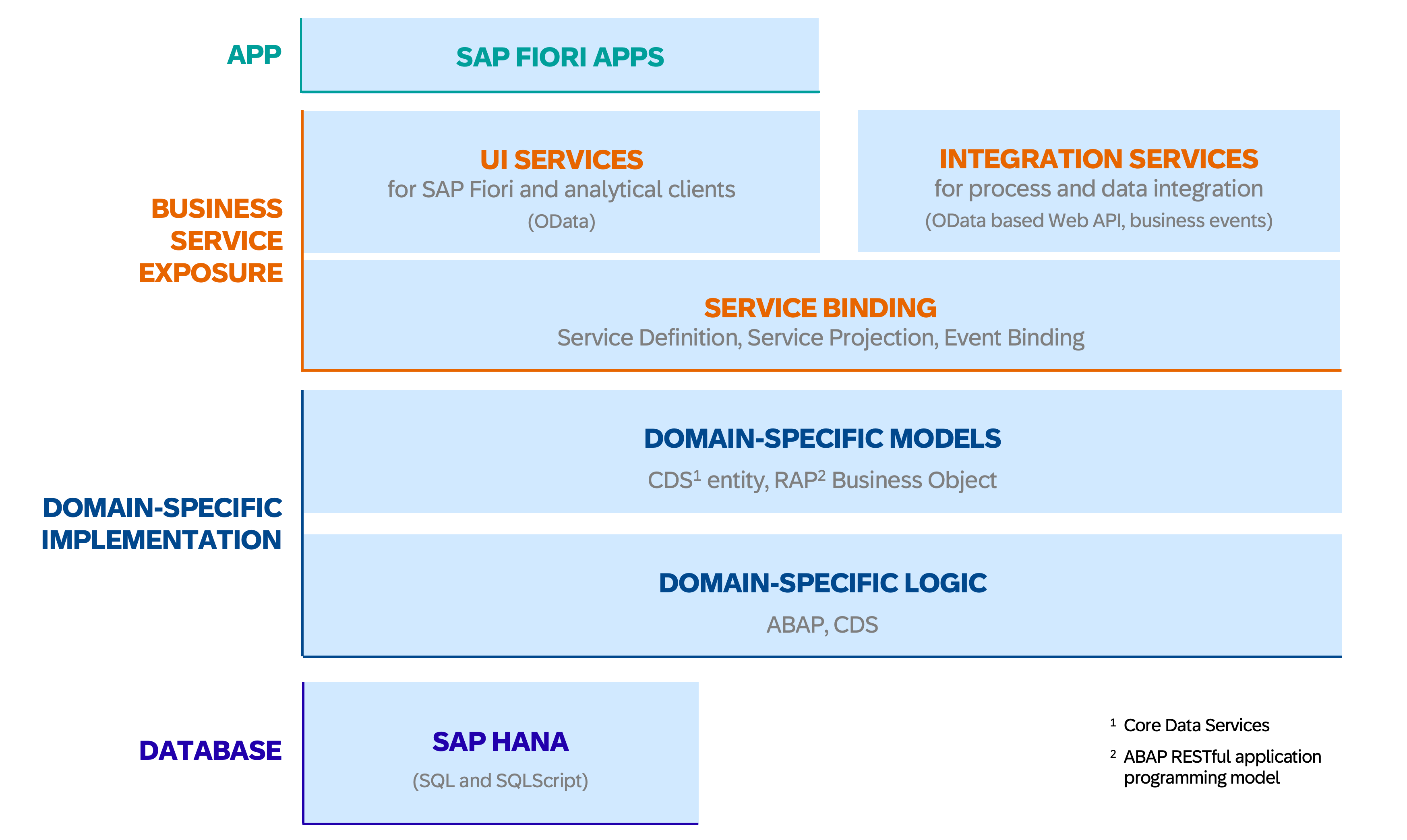
RAP Big Picture, © SAP
Database Level
For new developments, the managed scenario should always be used in order to use as many functions as possible (CRUD handling, draft, …) automatically from the framework and to reduce manual development effort. Some differences in the unmanaged scenario can be found in the relevant section below. At the lowest level, the data model for the RAP business object is created classically via DDIC tables or, on newer systems, with CDS table entities. Each node that is later to be published as its own EntitySet via RAP receives its own data storage. Care must be taken to use UUIDs as keys and to include the UUID key of all hierarchically higher nodes.
Virtual Data Model
Based on the tables, the virtual data model (VDM) is now built via CDS Views - more information about this development object can be found in chapter Core Data Services. According to the SAP recommendations, several levels or layers should be set up for this (from bottom to top):
- DB-Tabelle
- I_ Basic Interface View (renaming of fields, … may not be necessary when using CDS Table Entities)
- R_ Restricted Base View (Reuse Layer, Composition Tree for RAP with app specifics)
- I_ (optional) Composite Interface View, Released API for expansion based on the R_View
- C_ Projection View (Consumption Layer, projection with app-specific UI annotations)
To indicate within the CDS view that your CDS views are used for RAP, you can include the suffix _TP in the name. Although SAP recommends this, we believe it is not necessary.
There is a maximum of one restricted layer per business object, for which the BO behavior is also defined. However, if this BO is used by multiple, separate applications, you have the option of creating multiple consumption layers later on, where you can add app-specific virtual fields in the CDS at this point or remove fields that are unnecessary for the respective use case from the selection. However, if virtual fields are relevant and valid for the entire RAP BO, they should be introduced at a deeper level in the Reuse Layer. The same applies to the linking of input help or language-specific texts that are to be used globally in the BO.
Behavior Definition and Pool
Building on the Root Reuse CDS View, a central behavior definition is created in the next RAP layer. This defines the available transactional behavior for the business object and contains central configurations for it. It is unique and multiple behavior definitions cannot exist for a given CDS composition tree. Each node of the tree is listed individually in the behavior definition and can be given an alias and can then be addressed under this via EML.
Behavior Projection
The aforementioned behavior definition exists as a single, centralized entity for each business object (composition tree) and determines the basic behavior that this BO provides. However, the BO can be used in multiple (or no) Fiori applications, and the specific requirements typically differ in each case. For example, the app should only allow certain users to delete existing instances—for other users, creating new instances will be less relevant. The projection layer therefore makes it possible to restrict the available behavior of the RAP BO for each individual app or API. Validations and determinations, however, are always applied automatically to the BO. Actions, for example, can be ignored in the Behavior Projection by simply not releasing them for use. Similarly, the fields to be displayed are restricted in the CDS Projection layer. The Behavior Projection refers to a Root Consumption CDS View, which is later used for the service definition.
OData Publication
In the RAP framework, the OData service is no longer published via the SEGW transaction, as was previously the case. Instead, the framework automatically handles the generation and provisioning with only a few configuration steps on your part.
First you need to create a Service Definition based on your Root Consumption CDS View. This lists all Consumption CDS Views to be published and allows you to assign an alias per source. Under this alias, the entity is later available in the OData service as an EntitySet. Other linked CDS views, for example as master data sources, do not have to be explicitly included; these automatically become part of the service when referenced from published CDS views.
Based on the service definition, a service binding is created in the next step. Here you can specify whether the OData service is intended for the use of Fiori interfaces, for analytical scenarios or simply as a web API. You also choose OData V2 or V4. After pulishing, you can directly call the Fiori preview for UI services or, alternatively, consume the OData service and test the delivered data via /IWFND/GW_CLIENT. Before S/4HANA 2025, the use of transaction /IWFND/V4_ADMIN is required for V4 activations on-premise.
Advanced RAP functionalities
RAP Unit Testing
The RAP framework naturally also supports the creation of unit tests to ensure that high application quality remains a priority throughout the development cycle. To this end, local test classes are defined in the Business Object’s behavior pool to, for example, verify the correct functionality of a RAP validation or ensure that executing an action leads to the desired result. These then directly call the ABAP methods of the class_under_test and can be run and evaluated in the ATC.
Alternatively, a separate test class can be defined that tests the RAP-BO via EML; here, too, master data used can be mocked and utilized via CDS test doubles – the reference to the BO is established by "! @testing BDEF:<rap_bo_name>. Further information and concrete examples are available, among other places, in this RAP Workshop.
Extensibility
Since the S/4 Release 2022, it has been possible to extend RAP Business Objects. If the creator of a BO (e.g., SAP, a partner, or a customer) has enabled extensibility for it, there are extensive options for expanding the BO’s out-of-the-box functionality and adapting it to business requirements. Examples include adding new fields via Data Model Extensions, adding behavior via Behavior Extensions or creating entirely new nodes in the BO composition tree via so-called Node Extensions. When developing your own solutions, be sure to enable all development objects for extension if desired. A practical hands-on session is available in RAP Course 630.
Unmanaged scenario
If you cannot develop your application on a greenfield site, the unmanaged scenario offers the possibility of also publishing existing legacy coding via a RAP BO. Unfortunately, you don’t have the convenient features of CRUD out-of-the-box. Instead, you have to implement both the interaction phase and the saving sequence completely yourself. The local class cl_abap_behavior_saver is used to program how the changes from the interaction phase are persisted via your existing legacy coding (such as BAPIs) and how changes, deletions or new creations are recorded. However, you also have the option of manually implementing unmanaged save or additional save in the managed scenario if required. You can find a hands-on here.
Entity Manipulation Language (EML)
The Entity Manipulation Language was added to the ABAP kernel specifically for the RAP framework and allows you to use and interact with RAP business objects from within ABAP code. This means you can also call your own business objects or those released by SAP in custom applications. Among other things, you can create new instances, call actions, edit field values, and perform similar tasks. All nodes of the composition tree can be accessed using the appropriate syntax. For more information, the EML Cheat Sheet serves as a useful resource.
RAP Feature Showcase App
The SAP provides a central repository that can be installed as an example application in your S/4 system. This RAP Feature Showcase App shows you interactively which functionalities can generally be implemented with RAP and Fiori Elements and helps you to understand the necessary developments directly in the system. Once installed, you can run the app on your S/4 system and explore all available options. The app also provides specific information on how certain functions can be implemented.
Migration of CDS-Generated BOPF
You have the option to migrate existing BOPF applications to the more modern RAP framework if they were generated from CDS using @ObjectModel annotations rather than the BOBX transaction. For more information on how to do this, see the official Migration Guide: Migrating CDS-Generated BOPF to RAP.
Feature Availability Overview
As mentioned above, the RAP framework made significant leaps from one S/4 version to the next, particularly immediately after each release. Therefore, the features you can use depend heavily on your system version. In most cases, we do not recommend using it prior to Release 2021. The following list is intended to provide you with an initial overview of which features are supported and when, as well as what to expect in the future.
1909
- First release of RAP and EML in ABAP syntax
- Support only for queries (read-only) and unmanaged transactional apps with legacy code.
- OData v2 only
2020
- Virtual elements in the CDS view for RAP-BO (see transient fields in BOPF)
- Managed scenario, unmanaged/additional save (custom save handler), unmanaged lock
- Draft scenario (total eTag)
- OData v4
- Type & control mapping; OData navigation across more than two BO hierarchy levels
- Documentation via Knowledge Transfer Document for behavior definition, service binding
- Actions/Functions allow other entities/structures as result return parameters
- Control structure for Create provides information on which fields were not populated by the client
- Dynamic operation/feature control
- Introduction of the DVM (Determinations-Validations-Machine) with trigger operations and fields
2021
- Additional implementation for draft actions
- Simulation mode for COMMIT ENTITIES (EML)
- Singleton root instance for multi-line editing of multiple main entities (customizing entries, etc.)
- Additional actions and functions in behavior projection
- InA service for CDS analytical queries
2022
- Extensibility of RAP business objects
- Business events (define and raise)
- Abstraction layer via the Business Object Interface
- Large objects (binary files, file upload)
- ADT Wizard: Generate ABAP Repository Objects (RAP generation based on a database table)
- Instance Factory Actions for creating entities
- Read Access Logging for RAP BOs
2023
- Side Effects for triggering field updates
- Extensibility of service definitions
- Initial release of the Background Processing Framework
- Migration tool for existing BOPF business objects (see below)
- Consumption of business events
2025
- Exclusively CDS-based data model (CDS Table Entities for persistence, CDS Simple Types, CDS Exact Cardinalities, CDS Scalar Functions, CDS Aspects – though without Draft and simple ENUMs)
- RAP modeling of hierarchies
- Collaborative draft (parallel collaboration on a BO instance)
- Fiori Elements tables for viewing and modifying RAP hierarchies
- RAP Cloud Documentation
- EML Cheat Sheet
- RAP Feature Matrix by Software-Heroes
- RAP Feature Cheat Sheet
- Migrating CDS-Generated BOPF to RAP using the Migration Guide
- RAP Feature Showcase App
- SAP Samples: RAP Repositories
- SAP Learning Course: Building Apps with RAP
- SAP Learning Journey: Creating a Fiori Elements App with RAP OData V4
- SAP Technology Blog: Getting Started with RAP