Version management in SAP
- Git Basics
- Use of Git-Based Solutions in ABAP Development
- Version Control Systems in the SAP Environment
- Comparison of Different Version Control Systems
- Deployment Scenarios
- Comparison of the development process with different version management
- Aligning ABAP and Non-ABAP Development Processes Using Git-Based Tools
- Integration with Other Components
- Security Aspects
- Risks
- Recommendation
The documents that must be retained in accordance with HGB, AO and GoBS also include the repository objects in ABAP. For a long time, this was achieved through the integrated version control within the ABAP Workbench (SE80). In recent years, however, ABAP has evolved, whether through the use of an external development environment (ABAP Development Tools), the use of Git version control, or the development of additional repository objects that cannot be developed in the ABAP Workbench. This raises a key question for every ABAP developer:
- Which version control system should I use, and when?
This chapter is therefore intended to provide an overview and a comparison of version control solutions within the SAP universe for ABAP developers.
Git Basics
Git is a distributed version control system that is available as free and open-source software. It was developed in 2005 by Linux creator Linus Torvalds. In the field of programming, it is used to:
- Track your own changes
- Undo changes
- Share changes with others
- Retrieve updates from others
This results in the following advantages:
- Development can proceed simultaneously, e.g., for different features
- Version control prevents work that has already been done from being lost or overwritten
- If necessary, you can revert to earlier versions or work on different versions simultaneously
Key Terms
- Repository: A repository (or “repo”) contains all files, including their previous versions. This ensures that all changes ever committed to the repository are always available, and it allows you to track who made which changes and when.
- Branches: When using Git, branches are used to create a separate line of work. This can then be viewed as a new context in which work is carried out. For example, the development of a feature can take place in its own branch, which is then merged back into the main branch upon completion and after testing.
- Versioning: In Git, versioning logs all changes made. Using a “commit,” the changes can be added to the repository; a new version of the file(s) is then stored in the repo. Subsequently, different versions can be compared, changes can be undone, or you can revert to an earlier version.
Use of Git-Based Solutions in ABAP Development
In many programming languages, managing program code in a Git repository is standard practice. Thanks to the work of Lars Hvam Petersen, who made it possible to store ABAP code in a Git repository through his free open-source solution abapGit, Git-based solutions are playing an increasingly important role in the ABAP world. The use of Git-based solutions in ABAP development offers the following technological advantages:
- Standard version control features: By using Git, standard features can be utilized, such as rolling back changes not just for a single object, but for all objects simultaneously.
- Simultaneous collaboration among multiple developers on different requirements: Using Git allows multiple developers to work on different requirements at the same time using branches.
- Support for external tools: It is now possible to use not only SAP products for the development workflow but also external tools, for example, to test your code. Additionally, CI pipelines can be built, which is not possible with the standard transport mechanism.
- Versioning: Previously, it was only possible to track a single version of an object. Now, it is possible to version a set of objects using tags. This has the advantage that the application can now have a release-oriented structure.
- Code is centralized: The code is located in a central location, and all changes to the application are committed there. In addition to the ABAP code, other components of the application, such as Fiori or .NET developments, can also be stored in the Git repository. Documentation can also be stored in Git.
In addition to the technological advantages, there are also organizational benefits:
- Git is standard solution: It is easier to get other people excited about SAP development if they already know tools or technologies from other programming languages. Git is the standard solution for other programming languages and no new know-how needs to be developed. Especially students who already know Git can then become more enthusiastic about ABAP.
- Uniform format for programming languages: The Git repository can store not only SAP developments but also allow other development teams to centrally store their code there.
- Format: The format can be read by anyone. It is not encrypted, and all changes can be traced. This means that even an auditor can view all changes and track when and by whom they were made.
Version Control Systems in the SAP Environment
The following version control systems are available in the SAP environment:
Server-Based Version Management
Server-based version management is active for all editable objects in the ABAP Workbench. Version control can be accessed via
- SE80 - Object Navigator
- SE09 - Transport Organizer
- the display and maintenance transactions for repository objects
be called.
The corresponding objects are versioned each time a transport is released.
Local Version Control in ABAP Development Tools
The ABAP Development Tools, based on the Eclipse IDE, offer built-in version control for development resources, which can be executed using the ABAP Compare Editor and provide extensive comparison options:
-
Client-based local versioning: Eclipse provides built-in local versioning. Whenever an object, such as an ABAP class, is edited and saved, Eclipse stores a version according to your personal settings. This is useful for tracking changes made before a transport is released.
-
Server-based revision history: - This is equivalent to local version management and displays versions based on the current status and released transports. Compared to the GUI-based version, changes here, especially in classes, are much clearer and easier to understand. It is also possible to use other systems that are integrated into Eclipse as ABAP projects for version comparison (e.g. central development system line and Q system of the production line). No RFC connections between the systems are required; the comparison takes place locally.
Details can be found in ADT guidelines from DSAG
abapGit
abapGit is a Git client developed in ABAP. It was developed by Lars Hvam Petersen and is an open-source project. With abapGit, developers can connect Git version control to the SAP Application Server and create ABAP development objects in a Git repository.
gCTS
Unlike abapGit, gCTS (Git-enabled Change and Transport System) is an extension to CTS provided by SAP. It supports the integration of Git into the existing CTS to enable modern version control features.
Version Control in SAP BAS
SAP Business Application Studio provides companies with a tool for developing their applications and extensions related to SAP solutions. The provider offers this development environment as a cloud-based service.
Integration with Git is provided to simplify version management. However, versioning is also possible with other systems.
Comparison of Different Version Control Systems
SAP System and Availability
The version control system is available in the following SAP systems.
| Tool | SAP system | System availability |
|---|---|---|
| SE80 (Local version management) | SAP OnPrem | Since at least 2007 |
| ABAP Development Tools (Version Management) | SAP OnPrem/SAP Cloud | Since 2012 |
| abapGit to SAP GUI | SAP OnPrem | SAP BASIS version 702 |
| abapGit to ADT | SAP Cloud/SAP OnPre | Since 2018 |
| abapGit in the Cloud | SAP Cloud | Since 2018 |
| gCTS in the Cloud | SAP Cloud | S/4HANA EM 1909 FPS00 |
| gCTS OnPrem | SAP OnPrem | S/4HANA EM 1909 FPS00 |
| SAP BAS | SAP Cloud/SAP OnPrem | Since 2020 |
Scope of Functions
The following documentation describes the scope of functions for the respective version management tools
| Tool | Functional Scope |
|---|---|
| SE80 (Local version management) | SAP Version Management |
| ABAP Development Tools (Version Management) | ADT User Guide |
| abapGit to SAP GUI | abapGit User Guide |
| abapGit to ADT | BTP Working with abapgit |
| abapGit in the Cloud | abapGit |
| gCTS in the Cloud | gCTS |
| gCTS OnPrem | gCTS |
| SAP BAS | [Documentation still missing] |
Scope of Versioning
Version management covers the following scope
| Tool | Version Scope |
|---|---|
| SE80 (Local version management) | Each individual object |
| ABAP Development Tools (Version Management) | Each individual object |
| abapGit to SAP GUI | At the package level |
| abapGit to ADT | At the package level |
| abapGit in the Cloud | |
| gCTS in the Cloud | At the transport layer level |
| gCTS OnPrem | At the transport layer level |
| SAP BAS |
Trigger Point
Version management is triggered as follows:
| Tool | Trigger Point |
|---|---|
| SE80 (Local version management) | With every transport release |
| ABAP Development Tools (Version Management) | After each save/activation |
| abapGit to SAP GUI | When triggered manually or automatically in the background |
| abapGit to ADT | When triggered manually |
| abapGit in the Cloud | When triggered manually |
| gCTS in the Cloud | Upon release for transport |
| gCTS OnPrem | Upon release for transport |
| SAP BAS | When triggered manually |
Applications
The following applications, in addition to an SAP system, are required to use version management.
| Applications | |
|---|---|
| SE80 (Local version management) | No additional system necessary |
| ABAP Development Tools (Version Management) | ABAP Development Tools |
| abapGit to SAP GUI | Repository System as well as abapGit in the SAP system |
| abapGit to ADT | Repository System as well as abapGit in the SAP system and plugin in ADT |
| abapGit in the Cloud | Repository System as well as abapGit in the SAP system and plugin in ADT |
| gCTS in the Cloud | Repository system and gCTS configuration |
| gCTS OnPrem | Repository system and gCTS configuration |
| SAP BAS | Repository system and access to SAP BAS (licenses) |
Deployment Scenarios
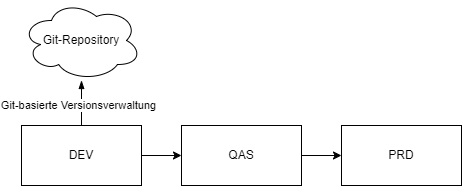
Common Three-System Environment
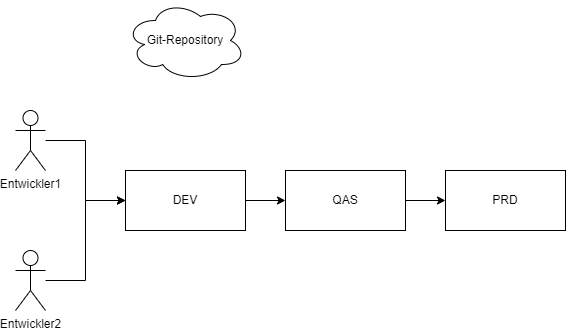
In this deployment scenario, the code is transferred from the development system to a Git repository using the Git version management system.
Software Provider
This use case describes the exchange of source code between a software vendor and its customer via a Git repository. 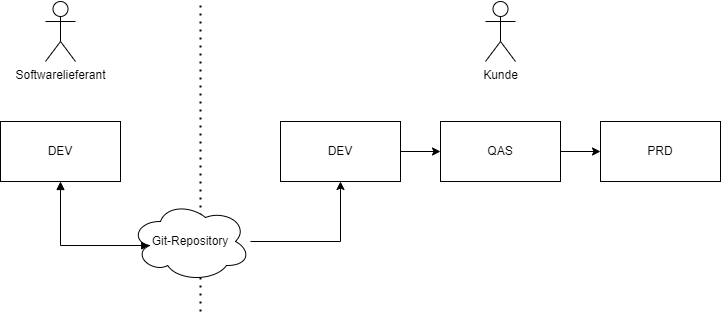
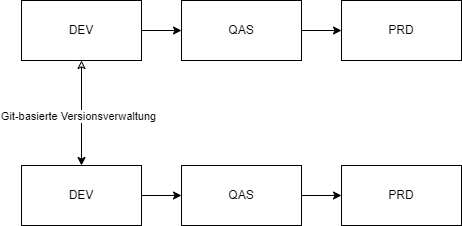
Distribution Across Different System Environments
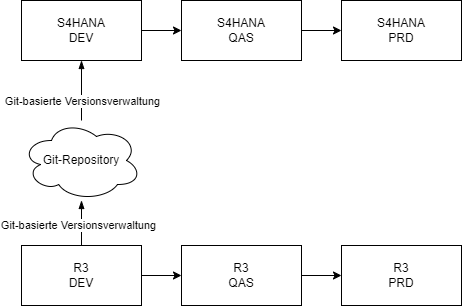
This involves exchanging source code between different system environments. This makes it possible to use the same source code and continue working without the need for cross-system transfers.
Recovery
This scenario describes the possibility of restoring an older version from the Git repository. This does not require retrieving every repository object individually, but rather an older version of the entire application. 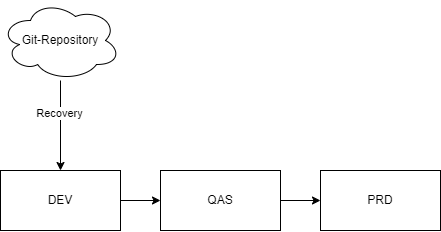
Working in Parallel
Custom Code Migration
Comparison of the development process with different version management
| SAP-Standard | git-basiert |
|---|---|
| Order must be created at the beginning | Commit is performed after the change |
| Distributing code - no control over changes in other systems | Central point of contact |
| Versioning of an application is not possible | Versioning of an entire application possible via standard functionalities |
| Undoing changes to a transport is only possible manually with massive effort and limitations | Going back to the previous commit allows you to reset all changes via gCTS or abapgit |
Aligning ABAP and Non-ABAP Development Processes Using Git-Based Tools
SAP developers are caught between the need for traditional stability and the demand for faster, more flexible development processes. While DevOps practices have already been successfully implemented in many other IT departments, SAP teams are still grappling with lengthy release cycles and more complex transport mechanisms. DevOps is a combination of “Development” and “Operations” and aims to integrate development and operations processes so that software is delivered faster, more reliably, and with higher quality. By using version control, an agile and efficient development environment can also be created in the SAP world.
Integration with Other Components
SAP Version Management serves as the starting point for working with ABAP code outside of an SAP system
Azure Pipelines
Azure DevOps streamlines the deployment process by providing pipelines that you can run. Source: https://community.sap.com/t5/technology-blog-posts-by-members/sap-change-management-with-azure-devops-transforming-enterprise-operations/ba-p/14130760
Apache Jenkins
Jenkins is one of the standard tools for continuous integration. To easily apply continuous integration or daily/nightly build components to an ABAP development system, version management can serve as a starting point.
Source: https://github.com/SAP/jenkins-library https://community.sap.com/t5/application-development-and-automation-blog-posts/continuous-integration-and-abap-jenkins-the-missing-link/ba-p/13489906
Security Aspects
Auditability
By precisely and comprehensively logging all changes, version control ensures an audit trail. This is important for meeting compliance requirements, as well as for investigating security incidents or conducting audits.
Backup and Recovery
Version control systems have mechanisms for regularly backing up data. In the event of data loss or corruption, previous versions of the data can be restored. This minimizes the risk of data loss and ensures the continuity of business processes.
Access Rights Management
The use of external version control systems provides functions for managing access rights. Administrators can thus specify who is permitted to access, edit, or view which data. This prevents unauthorized access and safeguards data confidentiality.
Change Tracking
Every change is documented, including the time and the person who made the change. This ensures transparency and facilitates troubleshooting.
Protection Against Tampering
External version control systems use cryptographic hashing algorithms to protect content and change history from tampering.
Risks
- Slow release cycles: Months of development phases and manual testing cause delays.
- Complex transport mechanisms: The traditional SAP transport management is not optimized for CI/CD.
- Lack of automation: Testing, deployment and code reviews are often still manual and error-prone.
- Resistance to change: Many SAP teams work according to classic waterfall methods and are skeptical about agile processes.
Recommendation
Definition of requirements
Choosing the right version control depends on the specific requirements and development process of the respective project or company. Define your requirements and then decide which version management you want to use.
Use of additional tools
Modern development practices such as CI/CD can be used with the help of version management. Think about what your pipeline should look like