User Interface (UI)
This chapter provides an overview of various UI technologies used in the context of ABAP systems. Due to its relevance, the main focus is on Fiori (SAPUI5). However, later in the chapter, an overview of older technologies—some of which remain relevant—will also be provided.
- For new developments, a Fiori-compliant interface should be used in the vast majority of cases.
- Whenever possible, new applications should be implemented using Fiori Elements. SAPUI5 Freestyle apps often tempt developers to embrace increased complexity due to the additional freedom they offer and generally result in significantly more work.
Fiori and SAPUI5
SAP Fiori defines the user experience for current SAP solutions and is based on modern design principles. It is SAP’s strategic user-interface technology and should be the default choice for most new developments. However, the term Fiori can refer to several related concepts:
- Fiori as a design language for modern user interfaces
- Fiori best practices for a good user experience
- Fiori Elements technology for annotation-based generation of applications
- Development of Fiori apps with SAPUI5
SAP’s design and UX recommendations can also be implemented with other technologies. However, following them helps new applications integrate naturally into the SAP environment and provide users with a consistent look and feel. These recommendations should be considered early in the process and, where appropriate, supported by design thinking or mockups created with SAP’s Fiori Design Stencils, for example in Figma. Developers and technical consultants should therefore be familiar with the Fiori Design Guidelines.
Apart from the purely visual and interactive aspects of the Fiori Guidelines, the term “Fiori” generally also refers to the actual development and technology behind Fiori apps. Here, one can choose between generated Fiori Elements apps without front-end coding and Freestyle applications developed using SAPUI5 (i.e., TypeScript or JavaScript). The Flexible Programming Model offers a hybrid of both. These different options are explained in more detail later in the chapter. In general, however, it can be said that Fiori applications are consumed by the user as a browser-based website. Therefore, use is no longer restricted to devices on which the SAP GUI can be installed - a modern web browser is sufficient. This means that Fiori apps can also be used on mobile devices such as smartphones, tablets or AR headsets.
This separation is accompanied by a clearer distinction between front-end and back-end development than you may be accustomed to from previous SAP development projects. As the backend, the S/4 system handles data storage, authorization checks, and the majority of the transaction logic for apps. Externally, this is published as an OData service. This serves as an interface for the actual front-end app (the Fiori app running in the browser) to read and write data or perform actions. This communication via OData is, by definition, stateless; thus, the backend is the single source of truth for the data state and manages the majority of the data logic. In certain scenarios, this two-part structure can complicate development. For example, it also gave rise to the need for the draft concept to enable the maintenance of intermediate states for data records.
Even though it has now been archived, we would like to point out the (English-language) DSAG UI5 Best Practice Guide at this point. The following table compares the advantages and disadvantages of SAPUI5:
| SAPUI5 Advantages | SAPUI5 Disadvantages |
|---|---|
| Comprehensive collection of standard UI elements that greatly simplify implementation. | JavaScript required (ABAP only in the backend). Therefore skill building is necessary. |
| Most modern look | SAP Gateway required (additional cost if installed separately) |
| Theoretically, everything that HTML5 allows in conjunction with JavaScript is possible. | In special cases there may be missing features and poorer performance compared to SAP GUI / ALV. |
| Use on tablets and smartphones. | Complex apps require more effort (stateless apps) |
| Responsive UI (automatic adaptation to the respective device) | |
| Use of end device capabilities such as cameras | |
| Native SAP Fiori launchpad integration | |
| Relatively new, constantly evolving technology. Therefore optimal integration into current web browsers |
Fiori Elements
The Fiori Elements framework makes it possible to implement full-featured Fiori enterprise applications with little to no front-end experience (JavaScript, XML). SAP provides several pre-built floor plans (app types) that are generated based on an OData service. The most common use case is the combination of List Report and Object Page. These types allow you to implement transactional scenarios in which individual business records are listed in a searchable table and can be clearly created or modified on the Object Page. The Analytical List Page enables a standardized display for evaluating analytical data sets.
In principle, enriching the OData service with UI annotations is sufficient for creation. The desired configurations are stored in the CDS Consumption View or in the Metadata Extensions for this purpose. Published via the OData service, the Fiori Elements Framework evaluates the annotations at runtime and generates the Fiori app accordingly. The ABAP RESTful Application Programming Model (RAP) is particularly suitable for the development of transactional Fiori Elements applications. For development, reference is made to the DSAG ADT Guide, as the necessary UI annotations to generate Fiori Elements apps can only be created in the Eclipse development environment.
The UI5 Demo Kit contains official SAP tutorials and courses to help you get started with Fiori Elements development. The Fiori Elements Feature Map provides an overview of the available capabilities and explains how to implement individual features. Development using the Cloud Application Programming Model (CAP) is also possible; however, it is not the focus of this ABAP guide.
Fiori Freestyle
If the floor plans provided by SAP are insufficient for an application under development, the UI must be developed manually. This is done using Fiori Freestyle development. The Fiori development is implemented using the SAPUI5 framework, which requires knowledge of JavaScript, XML views and the MVC concept.
Using Fiori Tools, you can create an empty application shell connected to an OData service. However, the rest of the application logic must then be implemented manually. The display of the actual user interface is defined using XML views. For this purpose, SAP provides a wide selection of controls that save a lot of implementation effort and support a Fiori-compliant design. These can be viewed broken down by version in the SAPUI5 API Referenz.
SAPUI5 is also distributed under an open source license under the name OpenUI5. However, some components are not included in the distribution. In principle, though, it is possible to develop Fiori applications using this framework as needed, even without an SAP backend.
Flexible Programming Model
The Flexible Programming Model (FPM) offers a hybrid of generated Fiori Elements interfaces and manually developed SAPUI5 Freestyle interfaces. It is available starting with SAPUI5 v1.94 and only with OData V4. The FPM allows you to integrate Freestyle elements into a Fiori Elements application using standalone containers. Conversely, Fiori Elements modules can also be integrated into a Freestyle app. To get a sense of the benefits of the FPM, check out this CodeJam or this Learning Journey.
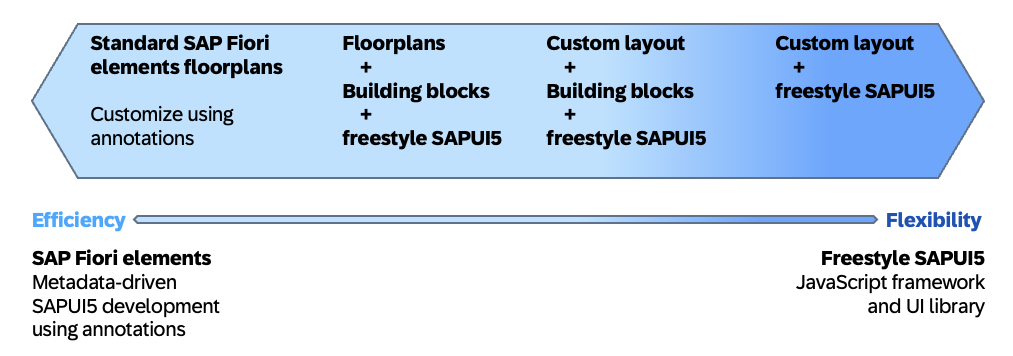
Flexible Programming Model as a hybrid of Fiori Elements and Freestyle SAPUI5, © SAP
The flexibility enabled by FPM offers you the opportunity to enjoy more freedom in development, even in generated applications. The strict choice between SAPUI5-Freestyle or Fiori Elements is pushed into the background to some extent. Encapsulated, Fiori Elements sections can be embedded via building blocks. The Flexible Programming Model Explorer provides live testable examples of FPM implementation options via Extension Points and Building Blocks and allows sample files or entire projects to be downloaded for reference.
Legacy Technologies
This chapter is intended to provide a brief overview of surface technologies not yet mentioned. Since these technologies are becoming less and less relevant over time, we will not discuss individual technologies in detail here.
| UI Technology | SAP Roadmap | Comment | Recommendation for new developments |
|---|---|---|---|
| Dynpro (classic) | support only | SAP advises against new developments. Lower development effort, especially for simple reports with a generated selection screen. Popular with power users. | Still useful for smaller developments in many cases, but not supported in S/4 Cloud. |
| Business Server Pages (BSP) | Support only | Replaced by Web Dynpro | Not recommended |
| WebClient UIF | Support only | Developed and deployed in a CRM system based on BSP technology | Still relevant for traditional CRM apps. SAP Hybris C4C relies on SAPUI5 / SAP Fiori in this area |
| Web Dynpro Java | Support only | Should no longer be used | Not recommended |
| Web Dynpro ABAP, including Floor Plan Manager | Minor enhancement | Less complex when used in combination with Floor-Plan Manager than as a standalone solution. | Consider SAPUI5 instead. |
| SAP Screen Personas | Minor enhancements | Configuration and scripting (JavaScript) to make existing applications based on traditional screens more appealing and easier to use. | Useful for revamping the user interface of existing screen-based programs. |
| CRM Web UI | N/A | User interface technology familiar from SAP Change Request Management. | Consider SAPUI5 instead. |